Information
Global reference material, workflow standards, and unresolved questions that apply across the season. Use the Games page for per-round checklists, match records, notes, and attachments.
Workflow
PlayHQ
Team Sheet
Deadlines
Questions
Source Images
Operational Workflow And Standards
Pre-Week Standards
Talk to PAPs and confirm likely ones before posting duties.
Submit the team on Thursday or Friday once selection is final.
Use the Games page for round-specific overrides, checklists, and match records.
Home Game Standards
If Craigieburn is listed first, treat the fixture as a home game.
Home games need the timekeeping / scoring setup checked before bounce.
Fill the Gatorade tub and complete any home-game drink setup.
Handover Standards
Players sign the required team-sheet copies before handover.
Team manager signs and photographs the prepared sheet before handover.
Pack the envelope and drop it at the club by the Sunday deadline.
Annotated Team Sheet Reference
Annotated Team Sheet Reference
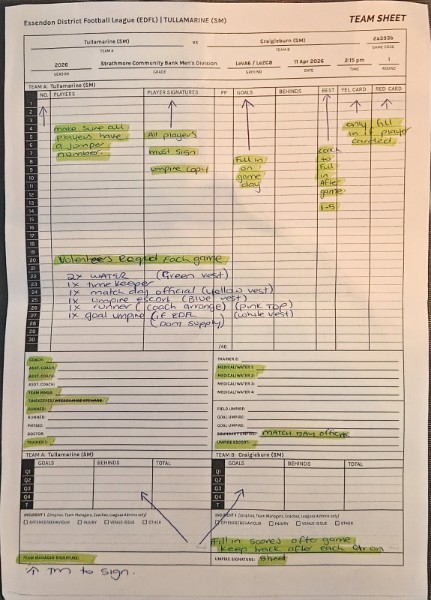
Use this marked-up image to see where signatures, best players, scores, official names, and sign-off fields go on the paper sheet.
Official Team Sheet PDF
`Team sheet.pdf` is the official form. Page 2 is the Craigieburn sheet with the current player list and known staff fields.
PDF preview is not available in this browser.
Open Team sheet.pdf
PlayHQ Step-By-Step
Use this page when you need the click path and checks, not just the short done-or-not-done checklist on the Games page.
Before You Open PlayHQ
Confirm the likely players before touching the online lineup.
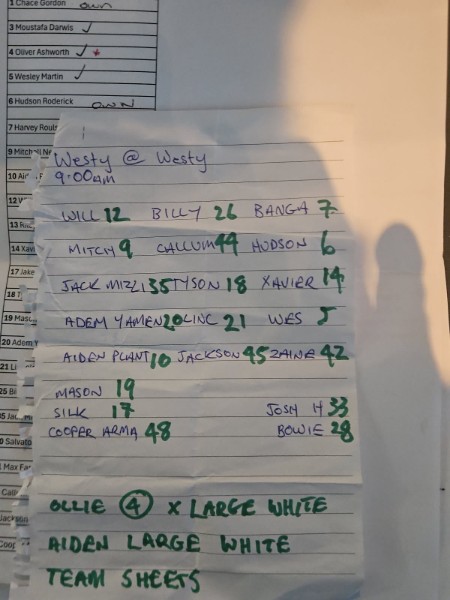
Confirm the jumper numbers from the handwritten weekly note.
Only use registered and eligible fill-ins.
Know the helper names you expect to enter so the paper sheet and PlayHQ match.
Enter The Team
Log into PlayHQ and open the Craigieburn team.
Open the current fixture for the selected round.
Click Manage .
Open the line-up or Add Line-up screen.
Select the players for this week.
Check every jumper number before saving.
Add any eligible fill-ins that need to appear for the match.
Checks Before Saving
Player names and jumper numbers match the handwritten source of truth.
Coaches and known match-day helpers are entered correctly.
The paper team sheet will match what is in PlayHQ.
Anything marked DNP on paper will be removed later from the final result.
After Saving And After The Game
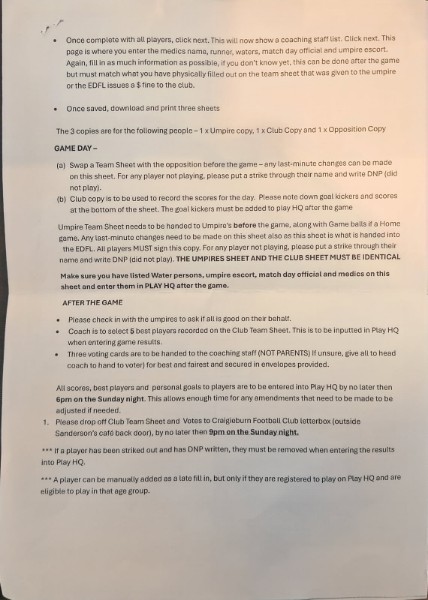
Download or print the 3 team sheets: umpire, opposition, and club copy.
Use the club copy during the game for quarter scores, goals, and best players.
After the game, enter scores, goal kickers, volunteers, and best players into PlayHQ.
Remove any DNP player before finalising the PlayHQ result.
Current PDF Already Shows
Craigieburn selected player list on page 2.
`Coach: Jason Pappin`
`Asst. Coach: Brad Roulston`
`Asst. Coach: Zac Trimbos`
`Team Mngr: Nathan Pappin`
Still Needs Completing
Player signatures.
Any late `DNP` changes.
Timekeeper / interchange, runners, trainers, medical / water, umpire escort, and any other blank role fields.
Quarter scores, goals, best players, card columns if relevant, incidents if relevant, and final signatures.
Sunday Deadlines
By 6:00 PM Sunday
Finish PlayHQ: scores, goals, best players, helpers, and DNP cleanup.
By 9:00 PM Sunday
Drop the club team sheet and votes at the club letterbox location.
Storage Migration And Sync
Cross-Device Storage
Operational data now lives in the shared team database and is cached in the browser for reloads and temporary offline use.
Legacy Browser Import
Check whether this browser still has legacy local-only data that should be imported into the shared database.
Import Current Browser Data
Refresh Shared State
Operational Questions To Confirm
Track unresolved process questions here so they do not get lost inside round notes.
Question
Resolved
Answer / Notes
Source Images In Logical Order
Re-ordered by workflow: master roster, weekly note, PlayHQ procedure page 1, procedure page 2, then the paper sheet example.
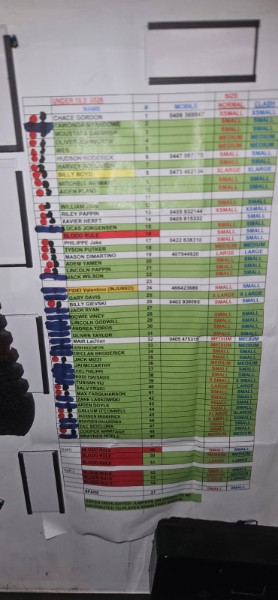
1. Master Roster Board
Master player list and admin reference.
2. Weekly Team Note
Handwritten weekly team selection, meet time, and uniform notes.
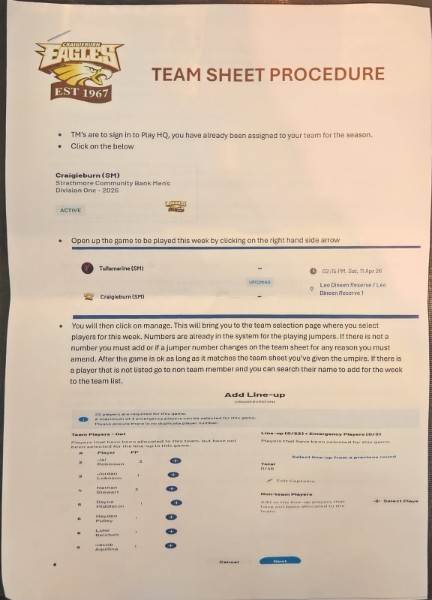
3. PlayHQ Procedure Page 1
How to open the fixture, manage the lineup, and select players in PlayHQ.
4. PlayHQ Procedure Page 2
Printing, game-day rules, and after-game entry steps.
5. Paper Team Sheet Example
Annotated example showing signatures, scores, best players, and official fields.